The session, the room and the support,
on your unit screens
An oncology day unit handles patients with complex schedules — chemo, immunotherapy, hormone therapy, targeted therapy — rotating rooms, varying infusion times, pre-session reminders and waiting-area notices for families. Printed signage cannot keep up. On screen: the room panel, current session, next patients, reminders and support resources, updated from your phone without printing anything.
Free first screen · No credit card · GDPR-compliant
MR ANTHONY SMITH
Next: Mrs Lopez 2:45 · Box 3 · Macmillan today · Cancer charity 5pm room 2
What goes on screen
in your oncology unit
Operational and support content managed from your nurses' station. No design work, no learning curve. Strictly informational — no clinical protocols on public screens.
Rooms and chairs panel
Current session and next patients shown by initials or appointment number — never by diagnosis or treatment name. Estimated infusion time, assigned box and lead nurse. Updated from the nurses' station in seconds.
Standard operational information
Today's blood test reminder, premedication notice, fasting if applicable, next oncology appointment and oncology nurse contact. Between-session warning signs displayed for information only — not a personalised protocol. Always: "For guidance only. Consult your oncologist."
Patient and family support
Psycho-oncology resources, clinical nutrition, oncology physiotherapy, Macmillan Cancer Support, Cancer Research UK and similar charities, local support groups, volunteer services, social resources and your centre's activities calendar. Updated whenever a new session or service is added.
Statutory health notices
Complaints procedure, GDPR, patient rights, insurer authorisations, responsible team and registrations, hygiene protocols and safe cytotoxic handling guidelines. Required by CQC and NHS/private sector regulation — visible and accessible without taking up staff time.
Suited to your unit,
not a one-size plan
Small outpatient unit: Starter €9/month (1 screen). Chemotherapy day hospital: Pro €19/month (3 screens). Dedicated day unit with multiple rooms: Business €59/month. Oncology network: Network €199/month. All plans include a 14-day trial without a card.
- 1 screen
- Room panel
- Support resources
- Statutory notices
- Update from phone
- 3 screens
- Separate content per screen
- Chair + waiting area
- Support resources
- Statutory notices
- Update from phone
- 10 screens
- Multiple rooms
- Family waiting area
- Team roles & permissions
- Priority support
- Business+ integration option
- 50 screens
- Multi-site management
- Account per location
- Dedicated account manager
- Custom onboarding
- SLA available
No card · Cancel anytime · See all plans
Where the screen goes
in the oncology unit
In an oncology unit the screen does not sell: it accompanies, points to the support available and brings order, without ever exposing a patient.
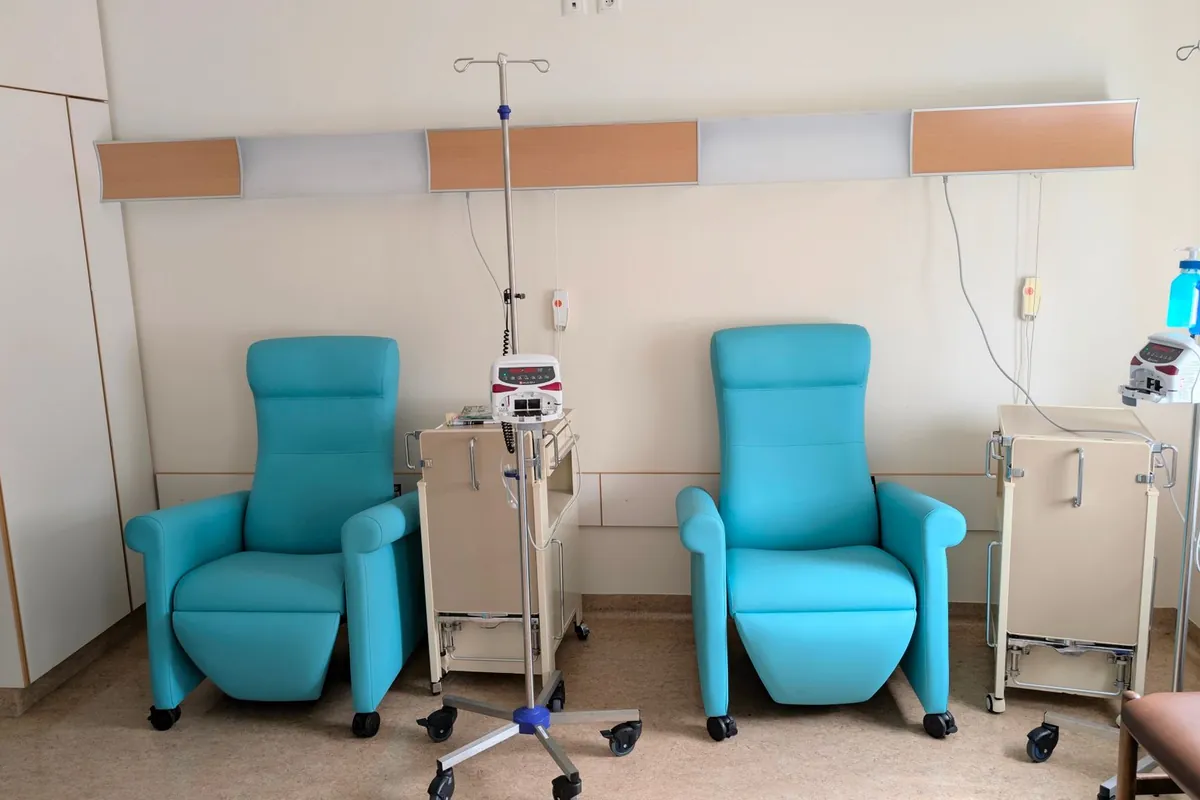
Infusion room and chairs
The chair panel: session in progress and next patients identified only by initials or an appointment number, estimated time and assigned bay. Never a full name or clinical data. It orders the day and brings calm without compromising anyone.
Family waiting room
The estimated session time, the room, transport and the services (café, toilets, accessibility). Those waiting — at a very hard time — know what to expect without asking the nurses, and that lowers the tension in the room.
Reception and entrance
The required patient notices: patient rights, complaints procedure, GDPR information, the responsible clinical team, insurers. Everything the rules require on display, always up to date and with no faded posters pinned to a board.
Staff area
The standardised operational information — the day's bloods, premedication, fasting where relevant, the next oncologist appointment — on a screen the patient does not see, so the team has the protocol in front of them without repeating it.
Accompany with dignity,
without exposing anyone
In oncology the screen works three things: absolute privacy, making people aware of the support that exists, and easing the load on staff doing very hard work.
A number or initials, never a name or a diagnosis. Sensitivity in oncology is at its highest. The panel identifies the patient only by initials or an appointment number, never by a full name or any clinical data. Digisini receives no medical records: staff type in the minimum and nothing about the patient leaves the unit. Dignity comes first.
Patients knowing support exists is part of the treatment. Psycho-oncology, nutrition, physiotherapy, cancer support charities (Macmillan, Maggie's) and support groups exist, but many patients and families do not know they are within reach. Having them visible in the room, calmly and without drama, brings those resources closer to whoever needs them, at the moment they need them.
Ease the load on staff doing very hard work. The operational notices that repeat — bloods, premedication, fasting, the next appointment — go on screen and stop falling on nursing, who get time and energy back for care and for the human contact that is irreplaceable in this unit.
To be straight with you: we are not a health record and we do not manage health data. The screen does not connect to the hospital system or any patient registry; it shows what staff upload. Content is hosted on servers within the EU/UK. For anything clinical you carry on with your own system.
It is not «an appointment»:
it is the fourth of six
A course of treatment has a planned number, and that number orders the entire experience of the person going through it.
The same room holds somebody on their first day and somebody on their last. And they do not need the same things. A person coming for the first time knows nothing about the circuit: where bloods are taken, why there is a wait between one step and the next, what is worth bringing, how long it usually runs. Somebody on their tenth knows it by heart and stopped reading that information long ago — they need something else.
What is needed later was almost always explained on day one, the day nobody can listen. The paperwork, patient transport, who to ask for the report, what support exists and who arranges it: all of that is covered in the first consultation, exactly when the mind is somewhere else entirely. Weeks later it is genuinely needed, and getting it back means asking again — and asking means saying out loud, in front of people, that you do not remember.
Having it permanently available is less than it sounds, and it is exactly what is missing. It replaces nobody and says nothing clinical: it is the circuit, the paperwork and the timings, written where the hours are spent and readable without asking permission. The difference between having to ask and being able to read is not convenience. It is not having to expose yourself one more time in a place where you are already exposed enough.
Straight with you: a screen does not accompany anyone, does not explain a diagnosis and does not shorten a wait. All it can do is keep the practical things to hand so nobody has to ask for them twice. The rest is the team's work, and no screen substitutes for it.
Common questions from
oncology unit managers
Your unit screens,
live this week.
Free first screen. No credit card. No installer. GDPR-compliant. Suitable for NHS and private oncology settings.
Start free →14-day trial on paid plans, no card · Cancel anytime · For guidance only — your treatment is directed by your oncology team
Take the button via email
We'll send a 1-click link to create your account whenever you want. No password, no card, no commitment. Your first screen FREE forever.
No spam. Just the link — you decide when to come in.